What are the default Pixel Basketball controls?
Not published. Rebind in Settings and screenshot if you want this page updated.

Pixel Basketball controls on Place 140510877927109 (Pixel:Games): official listing says rebind your keys in Settings and that the game plays on PC, mobile, and console. Exact default keybinds are TBA until a Settings screenshot exists. Play on Roblox.
Do not copy hold-to-charge dunk chords or NBA 2K button charts into this Place until Settings shows those binds.
| Device | Verified | Unknown |
|---|---|---|
| PC | Rebind in Settings (listing) | Default shot / dunk / steal keys TBA |
| Mobile | Supported (listing) | Tap vs hold for dunk TBA |
| Console | Supported (listing) | Trigger mapping TBA |
Matched by build plan, shared topics, and guide progression — not random related links.
Guide recap: rebind in the settings menu if defaults feel awkward, then practice timing on PC, mobile, and console. That is the entire verified procedure.
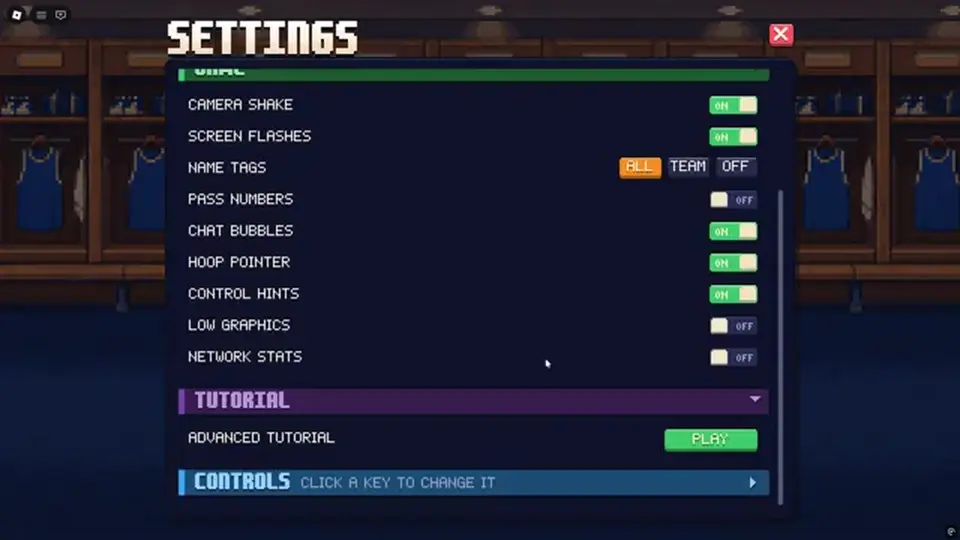
From the listing you at least need movement, shoot (meter), dribble, dunk/posterize, jump/block, and steal if steal exists in HUD. Third-party recaps mention steals, blocks, dunks, and threes as stats — that does not prove a unique steal key.
| Action | Why it matters | Bind status |
|---|---|---|
| Move | Closeouts and chase-downs | Device default TBA |
| Shoot | Green window | Must feel instant |
| Dribble | Break ankles | Input chord TBA |
| Dunk | Posterize | Trigger distance TBA |
| Jump / block | Chase-down | Do not bind to the same key as shoot if they collide |
| Pause / Settings | Rebind mid-session | TBA |
Listing claims all three. Input latency differs. If you swap from mobile to PC, re-learn the window — do not assume the same visual green is the same finger timing.
No official touch overlay is published. Expect on-screen buttons. If a dunk requires a swipe, that stays TBA rather than borrowed from another pixel hoops game.
Mashing shoot before the meter appears, binding shoot to a mouse button with huge click latency, and jumping to contest on the same finger you use to shoot. Fix binds, then drill on shooting.
The listing’s promise is one ruleset on PC, mobile, and console. The meter is visual. Your finger is not. A green you learned on a 144 Hz monitor will feel late on a phone with touch delay. Re-learn the window when you swap devices instead of blaming Playstyles.
Console players should look for Settings the same way PC players do. If a trigger is also jump, you will dunk when you meant to green. Split those actions if the HUD allows it. If it does not, say so with a screenshot so this page can drop the TBA.
Mobile recaps do not publish a button overlay. Expect on-screen shoot / dunk / block. A swipe-to-dunk from another pixel hoops title is not evidence. Practice taps on standing shots before you add dribble buttons.
Keyboard vs mouse: if click latency eats the window, bind shoot to a keyboard key. Guide recap only says rebind if awkward — that is the entire official instruction set. Everything else is device hygiene.
| Device | First rebind to try |
|---|---|
| PC | Shot off high-latency mouse if greens are late |
| Mobile | Make shoot a large tap target, not a shared dunk swipe |
| Console | Split shoot vs jump if they share a trigger |
Default WASD, default shot key, default dunk key, mobile overlay, console triggers: all TBA. Publishing a guessed chart would make this the wrong wiki on day two of a rebind patch.
What is verified: Settings exists, rebind exists, PC/mobile/console exist. Guide recap: rebind if awkward, then practice timing on all three.
Hold-to-charge dunk chords and NBA 2K turbo keys are unpublished here. If a bind chart includes “R to restart drill,” you are reading the wrong sport.
Device swap resets your window. Re-learn greens after you change hardware. Then split shoot vs jump if they share a control.
Keyboard shoot vs mouse click is a latency choice, not a secret tech. If greens are late, move shot off the mouse. That is the whole tip.
Console trigger sharing dunk and jump is the usual posterize accident. Split them in Settings if the HUD allows. If it does not, this page stays TBA instead of guessing Xbox buttons.
After you save binds, take ten standing greens before you test dunk. A dunk bind you never confirmed will eat jump contests in 5v5 and look like a meter problem.
These answers stay inside verified listing copy, recap labels, and HUD TBA. If a later screenshot contradicts a line, the screenshot wins.
Defaults are TBA. A guessed chart becomes the wrong wiki on the next rebind patch. Verified: Settings exists, rebind exists, PC/mobile/console exist.
Move shot off the mouse onto a keyboard key. That is a latency choice, not a secret tech. Re-learn the window after any hardware swap.
Usual posterize accident. Split them in Settings if the HUD allows. If it does not, this page stays TBA instead of guessing Xbox buttons.
Unpublished. Recap: rebind if awkward, then practice timing. Do not import hold-to-charge dunk chords or NBA 2K turbo keys.
Yes. Ten greens on a bad bind teach the wrong window. Rebind, then count makes, then queue 1v1.
Split them if Settings allows. Shared shoot/jump is how people mistime the green while trying to contest. If the HUD has one row, this page stays TBA instead of inventing a chord.
Rebind Sprint / Dribble if ankle-break inputs move the camera. Then ten greens. Do not import an NBA 2K turbo chord that this HUD never showed.
Not published. Rebind in Settings and screenshot if you want this page updated.
Yes — official listing. Trigger map TBA.
Unverified.
Touch delay. Re-learn the window on the new device. Do not immediately rebind three times and assume Playstyles broke.
Avoid it if Settings lets you split them. Shared buttons are how posterize inputs eat jumpers.
Guide recap only says the settings menu. Check both. Screenshot the path so this TBA can die.
Matched by build plan, shared topics, and guide progression — not random related links.